
Backup Process
Configuration File Backup
Backup FinClip configuration file, adjust path according to version
bashcp /data/finclip-installation/<current-version> /data/backup/Data Backup
Backup system database and storage services (MySQL and MinIO) by performing the following operations:
MySQL Database Backup
bashmysqldump -h <mysql_host> -u <user> -p<password> --all-databases > /data/backup/mysql-backup-$(date +%Y%m%d%H%M%S).sqlMinIO Data Backup
Use MinIO client (mc) to backup storage data:
bashmc alias set myminio http://<minio_host> <access_key> <secret_key> mc mirror myminio/<bucket_name> /data/backup/minio-backup-$(date +%Y%m%d%H%M%S)
Rollback Process
View Historical Versions
Login to the server containing
kubectlandhelmtools, execute the following command to view deployment history:bashhelm history finclip -n finclipSelect Rollback Version
Review the historical version output and find the version number to roll back to, typically the previous version before the current one (version before
deployedstatus).
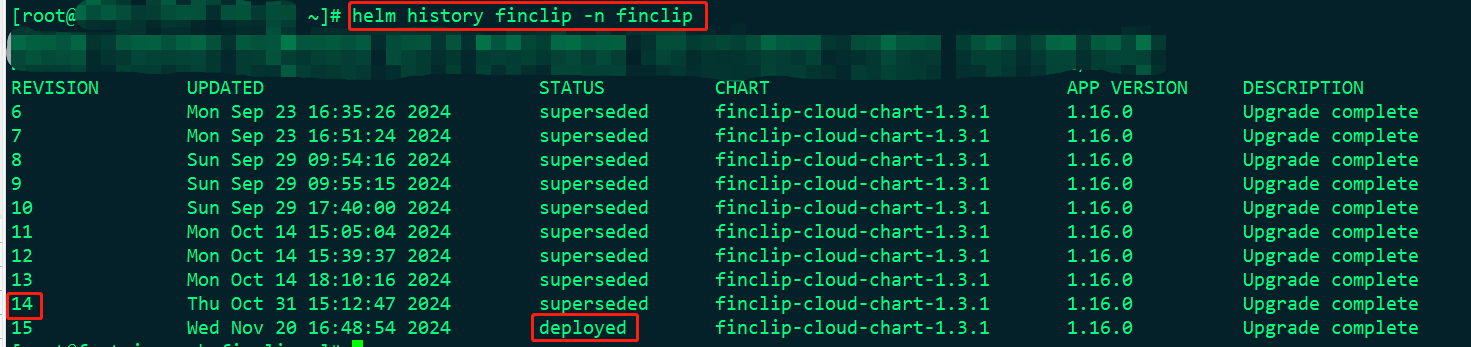
Execute Rollback Operation
Use the following command to execute rollback:
bashhelm rollback finclip <version_number> -n finclipNote: Replace
<version_number>with the version number to roll back to.Verify Rollback Result
Verify Pod status
bashkubectl -n finclip get podEnsure all Pods have
STATUSasRunning.