
FinClip backend services are developed in Golang with a microservices architecture. Each service is compiled and packaged into containers. We utilize industry-standard container management platforms for service orchestration. Therefore, most of our operational capabilities, including service failover, dynamic scaling, and resource management, rely on the container platform. Additionally, FinClip depends on mature open-source components as infrastructure to implement data storage, caching, and other functionalities in the business system.
Operational Architecture Diagram:
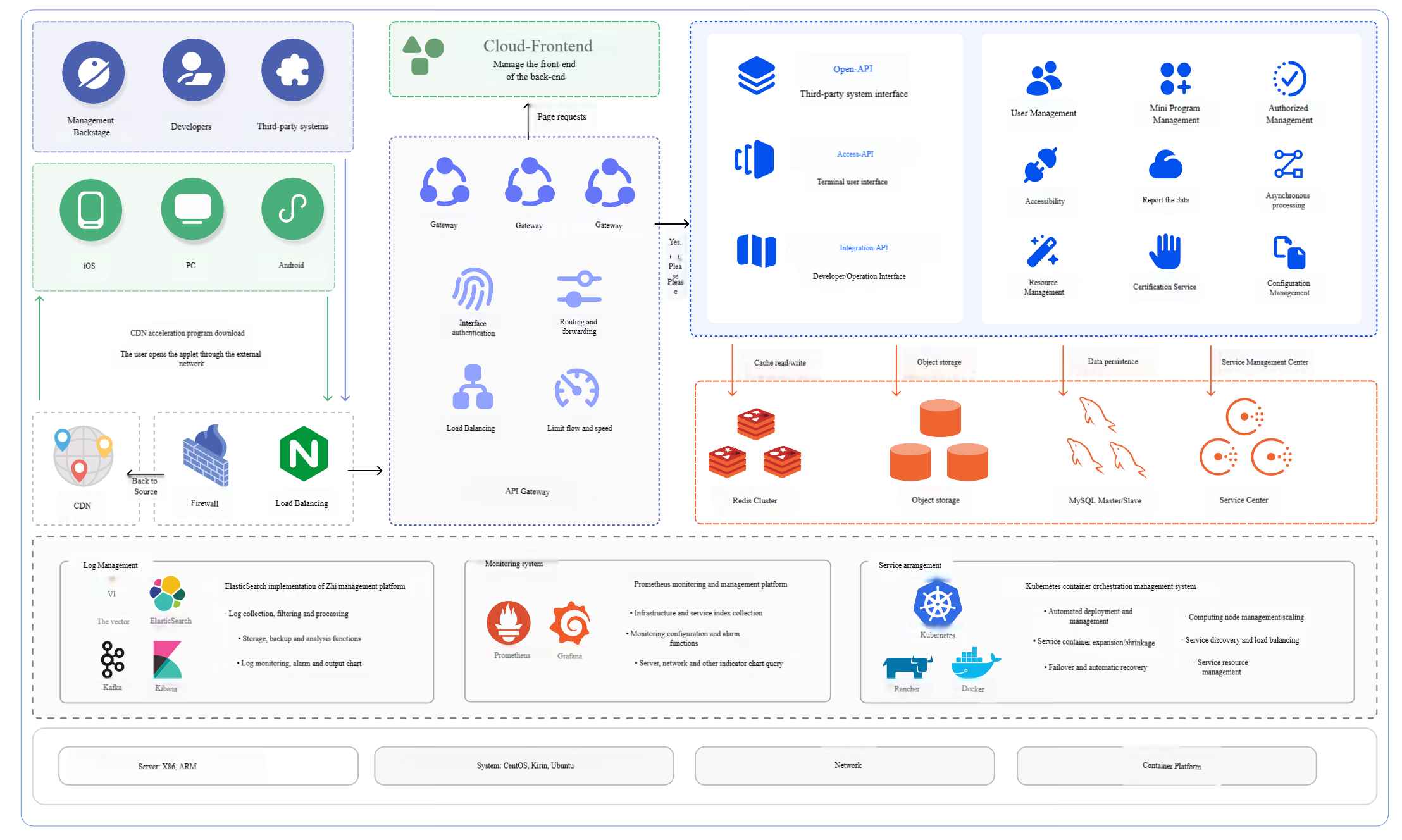
Architecture Components:
Infrastructure Services:
- Database: MySQL
- Data Cache: Redis
- Object Storage: MinIO (or S3-compatible storage service)
Container: Docker
Container Orchestration Platform: Kubernetes, Rancher (optional)
Logging System:
- Large Scale: Vector + Kafka + ElasticSearch + Kibana
- Small to Medium Scale: Loki + Grafana
Monitoring System: Prometheus
FinClip adopts a typical three-tier architecture design: Access Layer - Service Layer - Infrastructure Layer. Therefore, our platform architecture balances operational maintainability, scalability, and security.
Deployment Mode Comparison
Multiple deployment modes are available to meet different business scenarios and requirements.
| Deployment Mode | Applicable Environment | Architecture Design | Advantages | Disadvantages | Deployment Description |
|---|---|---|---|---|---|
| Single Node | POC, Test Environment | Compose deploys all services | Fast deployment, low cost | Average performance, single point of failure | Deploy all services on a single server |
| Small Cluster | Production, High Availability | Kubernetes with 4 servers | High availability, high resource utilization | Resource contention | Services evenly distributed across 4 servers |
| Medium-Large Scale Cluster | Scalability and disaster recovery requirements | Kubernetes cluster, multiple servers, business and infrastructure services separated | High availability, good performance, no resource contention | Higher cost | Similar to small scale, more servers with service separation |
| Dual Data Center Cold Standby | High business continuity requirements | Primary data center operational, cold standby ready for takeover | Higher disaster tolerance, flexible switching | High cost, complex maintenance | Both primary and standby data centers deploy Kubernetes clusters, primary deploys data service cluster, cold standby performs single-node synchronization |
Single Node Deployment Mode
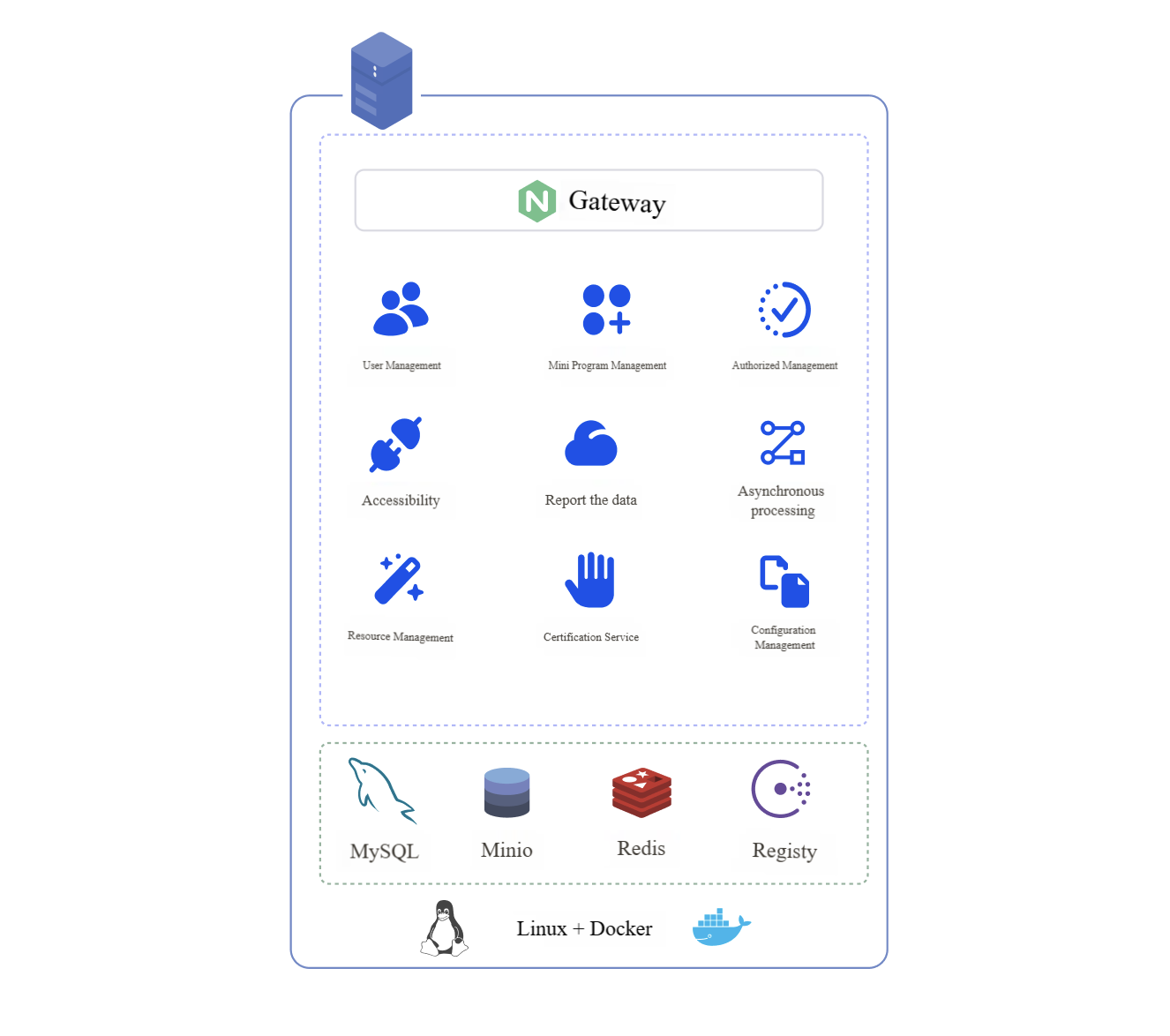
In single node deployment mode, all services are deployed on one server.
Operating System and Container Platform:
- Linux: Base operating system providing stable environment and resource management.
- Docker: Used for containerizing services, ensuring isolation and easy management between services.
- Docker Compose: Used for defining and managing multi-container applications, simplifying service startup and shutdown operations.
Containers and System Components:
- Gateway: Responsible for API gateway and request routing.
- Frontend and Backend Services: Frontend and backend services together form the core business logic of the application.
- Data Layer: Includes MySQL, MinIO, and Redis for data storage and cache management.
Server:
| Purpose | CPU | Memory | Storage | Deployment Content | Quantity | Reference TPS |
|---|---|---|---|---|---|---|
| Minimum Config | 4 cores | 8 GB | 100 GB | Database, cache, and FinClip microservices | 1 | 4000 |
| Recommended Config | 8 cores | 16 GB | 200 GB | Database, cache, and FinClip microservices | 1 | 6000 |
System:
- Chip Architecture: X86
- Operating System: CentOS 7.9 or Ubuntu 22.04, KylinOS V10, etc.
Cluster Deployment Mode
1. Small Scale Cluster
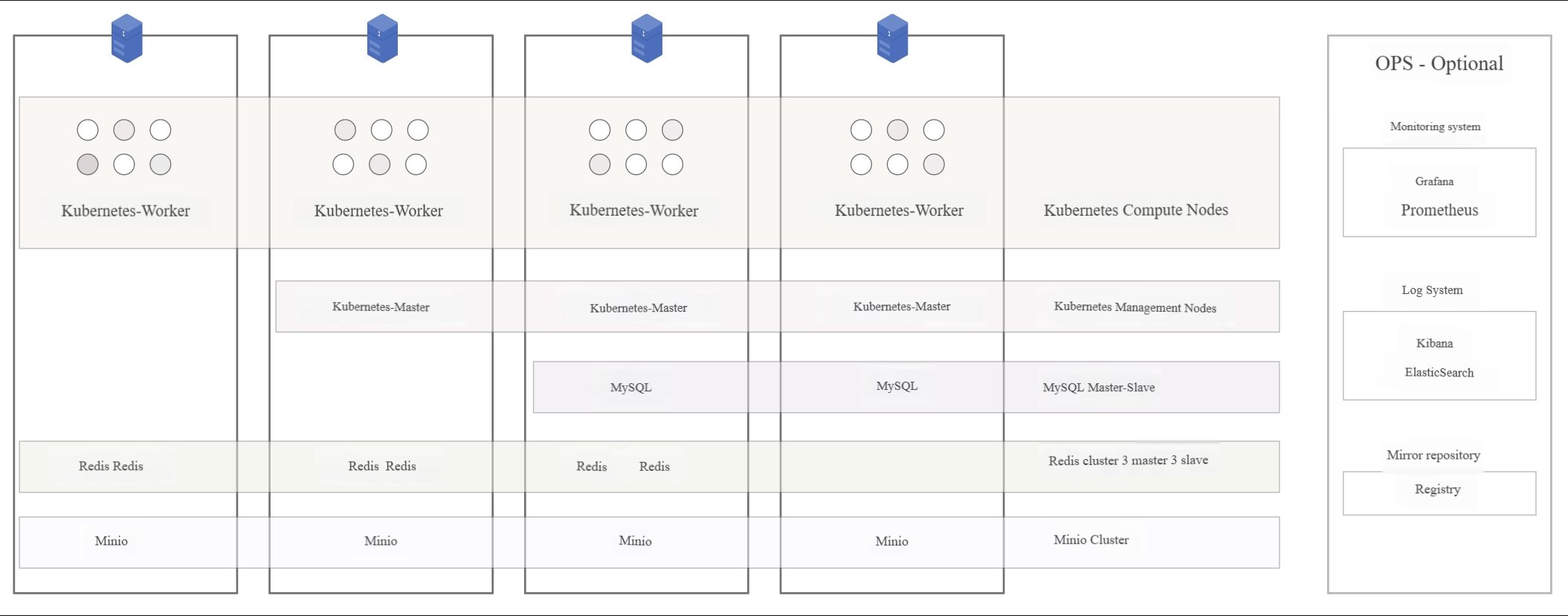
The small scale cluster deployment architecture provides minimal high availability, requiring four servers. Among the four servers, only one can go down. This is suitable for most customers with moderate requirements for high availability and fault isolation.
The small scale cluster will be deployed using Kubernetes. Required configurations are shown in the table below:
| Purpose | CPU | Memory | Storage | Quantity | Reference TPS |
|---|---|---|---|---|---|
| Business Service | 8 cores | 16 GB | 500 GB | 4 | 2w |
| Operation and Maintenance (Optional) | 8 cores | 16 GB | 500 GB | 1 | - |
Role distribution can be referenced in the figure below:
System:
- Chip Architecture: X86
- Operating System: CentOS 7.9 or Ubuntu 22.04, KylinOS V10, etc.
Deployment Description: All services will be evenly deployed across four servers. Database and cache systems are deployed on hosts using docker compose, while business services are deployed using Kubernetes, evenly distributed across the four servers.
2. Medium-Large Scale Cluster
Cluster mode deployment provides a certain level of software-based failover capability. The large-scale cluster deployment architecture is suitable for customers with requirements for scalability, disaster recovery, and other metrics. This cluster architecture design primarily focuses on fault isolation, fault recovery, and scalability.
There is no upper limit on the number of servers in a large-scale cluster. It supports multi-active and multi-data center deployment, customizable according to business scale and disaster recovery requirements. Compared to small-scale clusters, large-scale clusters can provide higher QPS, better performance, and better scalability.
Large-scale clusters will be deployed using Kubernetes. Required configurations are shown in the table below (SSD recommended for disk):
| Purpose | CPU | Memory | Storage | Quantity | Reference TPS |
|---|---|---|---|---|---|
| Business Service | 8 cores | 16 GB | 500 GB | 8 | 3w |
| Operation and Maintenance (Optional) | 8 cores | 16 GB | 500 GB | 1 | - |
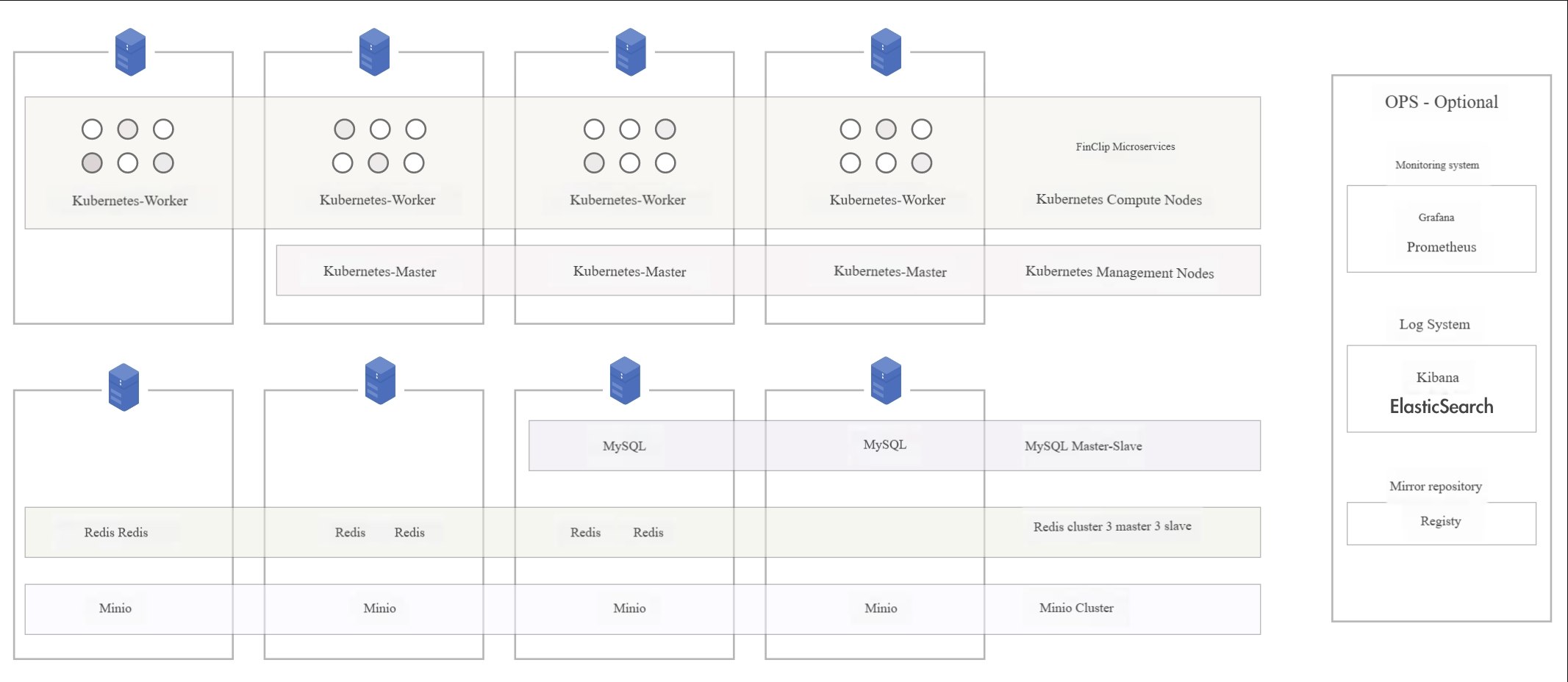
Role distribution can be referenced in the figure below:
System:
- Chip Architecture: X86
- Operating System: CentOS 7.9 or Ubuntu 22.04, KylinOS V10, etc.
Deployment Description: Similar to small-scale deployment, but large-scale cluster deployment uses more servers with business services separated from infrastructure services. Microservices are deployed with more instances to handle higher user traffic.
3. Dual Data Center Cold Standby Cluster
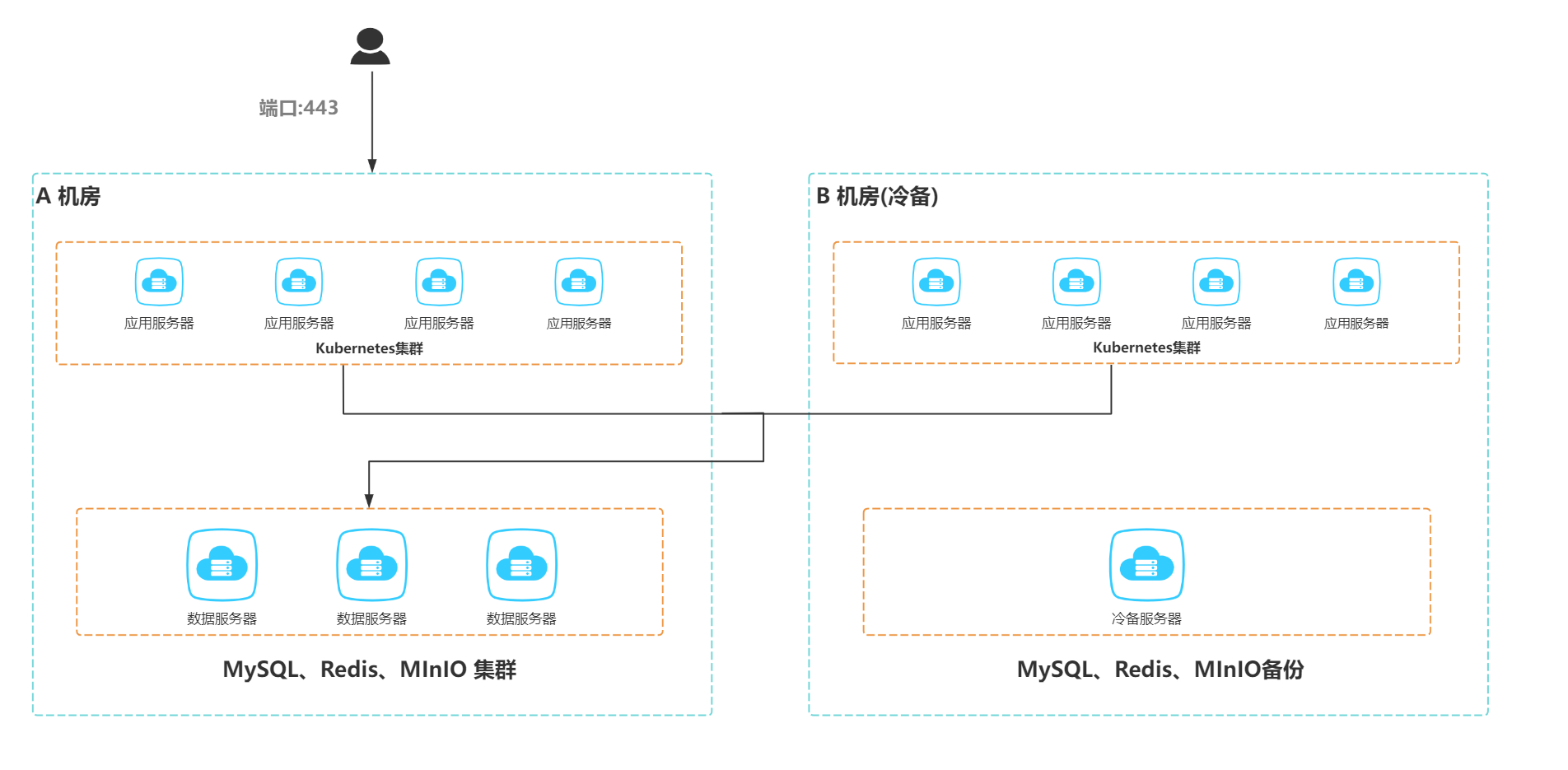
The dual data center deployment architecture provides higher disaster tolerance, suitable for customers with high business continuity requirements. The dual data center architecture typically includes a primary data center and a cold standby data center. Normally, only the primary data center provides services, while the cold standby data center remains on standby and is only activated when the primary data center fails.
Deployment Architecture
Primary Data Center: The primary data center handles all business loads, with all business services, databases, and cache systems running in the primary data center. Component deployment and resource configuration are typically similar to a small-scale cluster, ensuring normal business operations.
Cold Standby Data Center: The cold standby data center does not handle daily business but deploys the same service architecture and data synchronization mechanism as the primary data center. Through database backup or real-time synchronization, data consistency is ensured. Once the primary data center fails, the cold standby data center can quickly take over the business.
Required configurations are shown in the table below (SSD recommended for disk):
| Purpose | CPU | Memory | Storage | Quantity | Reference TPS |
|---|---|---|---|---|---|
| Business Service | 8 cores | 16 GB | 500 GB | 12 | 30k |
| Operation and Maintenance | 8 cores | 16 GB | 500 GB | 1 | - |
Role distribution can be referenced in the figure below:
Data Synchronization Mechanism
Database Synchronization: Ensure database consistency between primary and cold standby data centers through master-slave replication and database synchronization tools. The primary data center handles writes while the cold standby data center maintains data synchronization.
Cache Synchronization: Cache services such as Redis can synchronize cache data through persistence mechanisms. Cache data in the cold standby data center can be restored when the primary data center fails.
File Synchronization: Ensure consistency of business files and data through object storage synchronization mechanisms.
Deployment Description
- Business Service Deployment: All application services in both primary and secondary data centers are deployed using Kubernetes, distributed across 4 servers. The cold standby data center deploys the same architecture.
- Database and Cache: The database and cache systems in the primary data center use cluster deployment. The cold standby data center deploys single-node services and maintains data synchronization. Under normal circumstances, the cold standby data center does not handle data writes or business requests.